
Managing reserves
When an activity reaches its maximum number of participants, Squaddle automatically creates a reserves list – keeping track of members who are waiting for a spot, and handling what happens if someone drops out depending on your preferences.
How the reserves list works
Setting the maximum number of participants determines how many slots are available when you create an activity. And some slots may be taken before the invites are sent if anyone is marked in automatically when the activity is created.
Invites are sent out by email and WhatsApp at the same time, and Squaddle logs responses in chronological order, regardless of which channel they used. Once the maximum is reached, further participants are added to the reserves list automatically.
Organisers can see the full reserves list at any time but can't reorder it. Admins can still manually mark members in or out if needed.
Can users respond to an activity in advance?
Members can only mark themselves in for an upcoming activity once invitations are sent out – until then, the activity won't appear in their Schedule.
For one-off activities, invites are sent as soon as the activity is created. For repeating activities, organisers set day and time for invites to go out each week. The activity will appear in the member's schedule once the invites have been sent.
What happens when someone drops out?
Organisers choose how dropouts are handled when creating an activity. In most cases, you'll need to choose between two options:
Promote first reserve
- If somebody drops out, the first reserve is automatically promoted – whoever responded first after the maximum was reached.
- The first reserve will be notified – and admins be get an update about the change, too. If the first reserve can't make it, they'll need to mark themselves out.
- If they mark themselves out, the offer cascades to the next person on the reserves list, and so on.
Promote first reserve works well for squads where members tend to respond quickly.
If somebody drops out, the first reserve is always promoted – even if it's seconds before the activity is due to start. We do this to try to ensure spots are filled for every activity.
If a reserve isn't actually free to play, they need to mark themselves out promptly so the spot can cascade to the next person – otherwise the activity could end up with unfilled spots.
Promote first reserve isn't available with Upfront payments enabled, since a place can't be confirmed automatically before it's been paid for. You'll need to switch to Anytime payments.
Offer to all reserves
- If somebody drops out, the place is offered to everyone on the reserves list at once – rather than adhering to the order of the reserves list.
- Everyone on the list is notified that a spot is available, by email or WhatsApp simultaneously. Whoever responds first gets it.
- Anyone who doesn't get the spot stays on the reserves list – your position on the list doesn't affect your chances next time.
- If the activity uses Upfront payments, responding 'In' doesn't secure the spot – the member will need to pay to claim their place.
Offer to all reserves reduces the risk that spots aren't filled at short notice, since everyone on the list gets the same chance to claim a spot the moment somebody drops out.
It can mean more notifications going out for the same spot, but nobody misses out simply because they're further down the list.
Are members who didn't reply first time notified when a space becomes available?
No. Only members who responded 'In' to an invitation and didn't get a place are added to the reserves list. If you want to be notified about dropouts, you have to mark yourself 'In' even if you know the maximum number of participants has been reached.
How payment options affect reserves
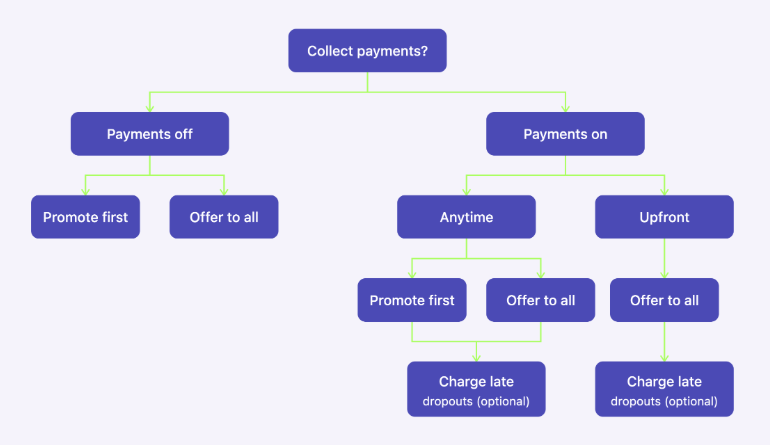
The options for managing reserves depend on whether you're collecting payments for the activity, and which payment setting you choose:
If you're not collecting payments, you can choose between Promote first reserve and Offer to all reserves, and there's no Charge late dropouts option.
If you choose Anytime payments, you still get both Promote first reserve and Offer to all reserves, plus the option to turn on Charge late dropouts.
If you choose Upfront payments, only Offer to all reserves is available – and you can still turn on Charge late dropouts.
Do members who are automatically promoted shortly before an activity still get charged for dropping out if they can't make it?
If you've enabled both Promote first reserve and Charge late dropouts, a member who's automatically promoted and then marks themselves out within 24 hours of the activity will still be charged – even though they had no choice about being promoted.
In this case, admins can waive the late dropout fee: go to the activity, find them in the Out list (they'll have a 'Late' label), and select 'Remove outstanding payment' from the three-dot menu.